How do I get good scores?
Each time you use Gameface in class, you will be able to see your scores at the top of the screen:
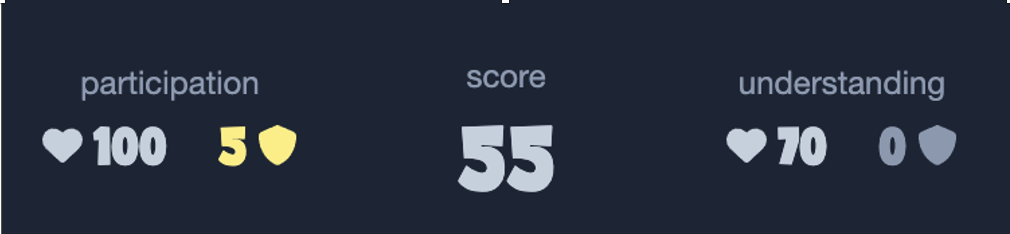
The score in the middle will simply go up whenever you do something good.
Your participation score measures how much you are participating actively during class. If you act like a passive wallflower, you will get a low participation score. If you dive in, you will get a high score.
Your understanding score measures how well you demonstrate your knowledge while participating. If you have no idea what you are doing, you will get a low understanding score. If you have a good idea what you are doing, you will get a high score.
Both participation and understanding are split into health and armour. We'll explain the difference in a bit, but for now just know that if you get 100 health then you are doing great and deserve full marks.
If you don't get great scores then don't worry, that will stay between you and teaching staff. Your score will only be shown to other students if you get a high enough score to place in 1st, 2nd or 3rd. There may or may not be prizes on offer for people who make it onto the podium.
How is participation calculated?
Gameface provides three different opportunities to participate (or not): by answering questions, volunteering for tasks, and completing class-wide tasks:
- When you are presented with a quiz question, you can choose whether to answer the question or not. Your participation will go down if you choose not to answer questions.
- When a volunteer is requested, you can choose whether you opt in or not (the volunteer will be randomly chosen from the people who opt-in). Your participation score will go down if you do not opt in.
- When a class-wide task is set, you can either mark the task as completed, or not. Your participation score will go down if you do not complete tasks.
If you answer all quiz questions, opt in when asked to volunteer, and complete all class-wide tasks, then your participation health would be 100. If you failed to answer any questions, opted-out of all volunteer tasks, and failed to complete any class-wide tasks then your participation health would be 0.
Some quizzes, volunteer tasks and class-wide tasks will be individual, while others will be completed in small groups. For group activities the group as a whole needs to decide whether to participate, and the scores of all participants will be impacted by the decisions made by the group.
How is understanding calculated?
Similarly, Gameface provides three different opportunities to demonstrate your understanding in class: by answering questions correctly, getting good feedback when chosen to volunteer, and getting good feedback for class-wide tasks:
- When you are presented with a quiz question, your answer that question will either be correct or not. Your understanding will go down if you answer a non-bonus question incorrectly, or if you choose not to answer it.
- If you are selected for a volunteer task, the tutor will (confidentially) rate your contribution as good, ok, or poor. Your understanding will go down slightly if you receive an ok rating, and significantly if you receive a poor rating. It will not be altered if you are not selected as a volunteer, even if you opted in.
- When you complete a class-wide task, the tutor will (confidentially) rate your contribution as good, ok or poor. Your understanding will go down slightly if you receive an ok rating, and significantly if you receive a poor rating. It will not go down if you do not complete the task, or if the tutor is not able to provide feedback for the task.
For group activities the group as a whole will be given the same feedback, and scores of all participants will be impacted by the feedback received by the group.
How do bonus questions and tasks impact my scores?
Bonus questions and tasks are completely optional. You can safely skip them without loosing any participation, and you can answer them incorrectly (or get poor feedback) without loosing any understanding. They are intended to provide a risk-free chance to recover lost understanding or participation health if you get behind during a class.
If your health is already full when you answer bonus questions or complete bonus tasks, then any extra points you earn will flow over into your armour. Armour doesn't count towards your grade.
How can I see how my scores were calculated?
You can get a detailed breakdown of how your scores are calculated for each room within Gameface. Just sign in, select your course, and then select Rooms in the sidebar (you might need to hit the menu icon on the left to make the sidebar visible if you are on a mobile).
From there you will see a full list of all rooms (i.e. classes) that you have attended. You can mouse over/hold down on a particular room to view your participation and understanding scores, and click the details link to view the breakdown.
Here is an example breakdown:
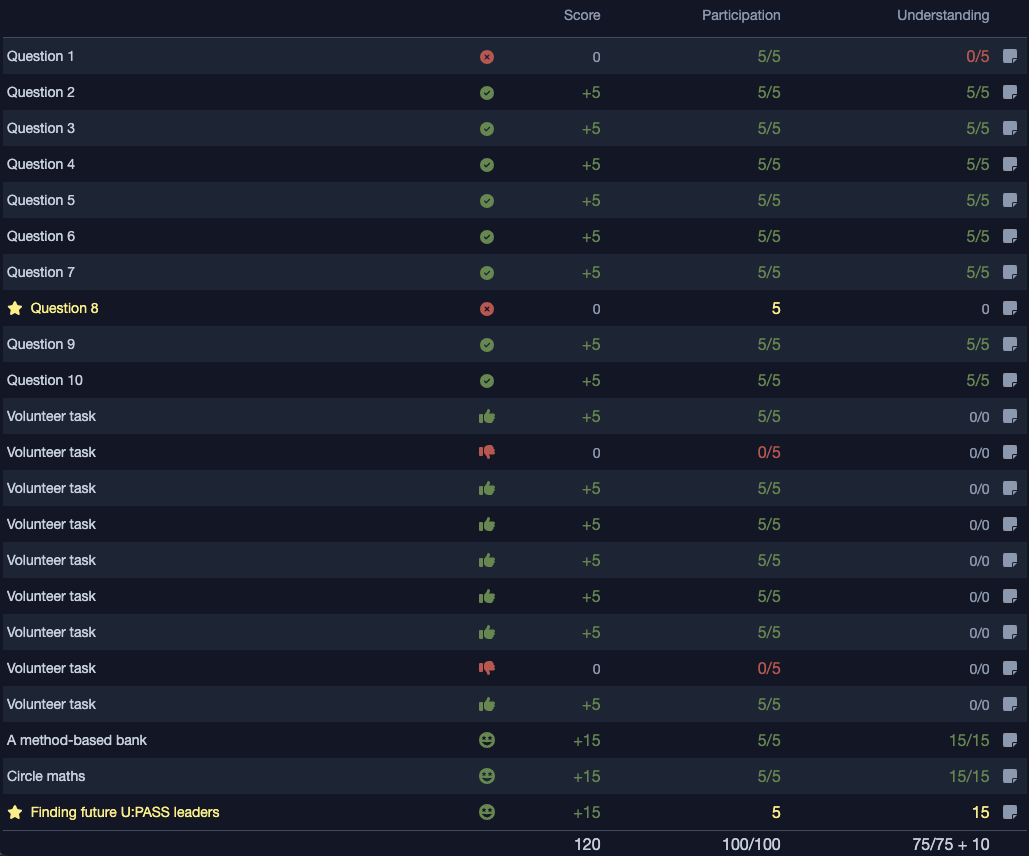
In the table there is one row for every quiz question, volunteer task, or class-wide tasks that occurred during the class. Bonus questions/tasks are indicated with a gold star.
The icons indicate what you did in response to the activity, for example whether you answered the question correctly, whether you opted into a volunteer task, what feedback you received for a class-wide task, etc. You can mouse over/hold down on any of these icons for an explanation.
The score column shows what impact this activity had on your main score, and the number at the bottom of this column is your total score. The participation and understanding columns show you what activity this action had on your participation and understanding points respectively. For non-bonus tasks, these values are the ratio of how many points you earned vs how many points were offered. For bonus tasks, this will only show you how many points you earned. The tally at the bottom of these columns shows the final ratio of how many points you earned out of those that were offered (i.e. your health) and how many additional points you earned over and above the ones that were offered (i.e. your armor).
In rare instances, teaching staff may make manual adjustments to your scores. If this occurs you will see a note icon next to the specific activity that was adjusted. You can mouse over/hold down over this icon for a tooltip that will explain why this adjustment was made.